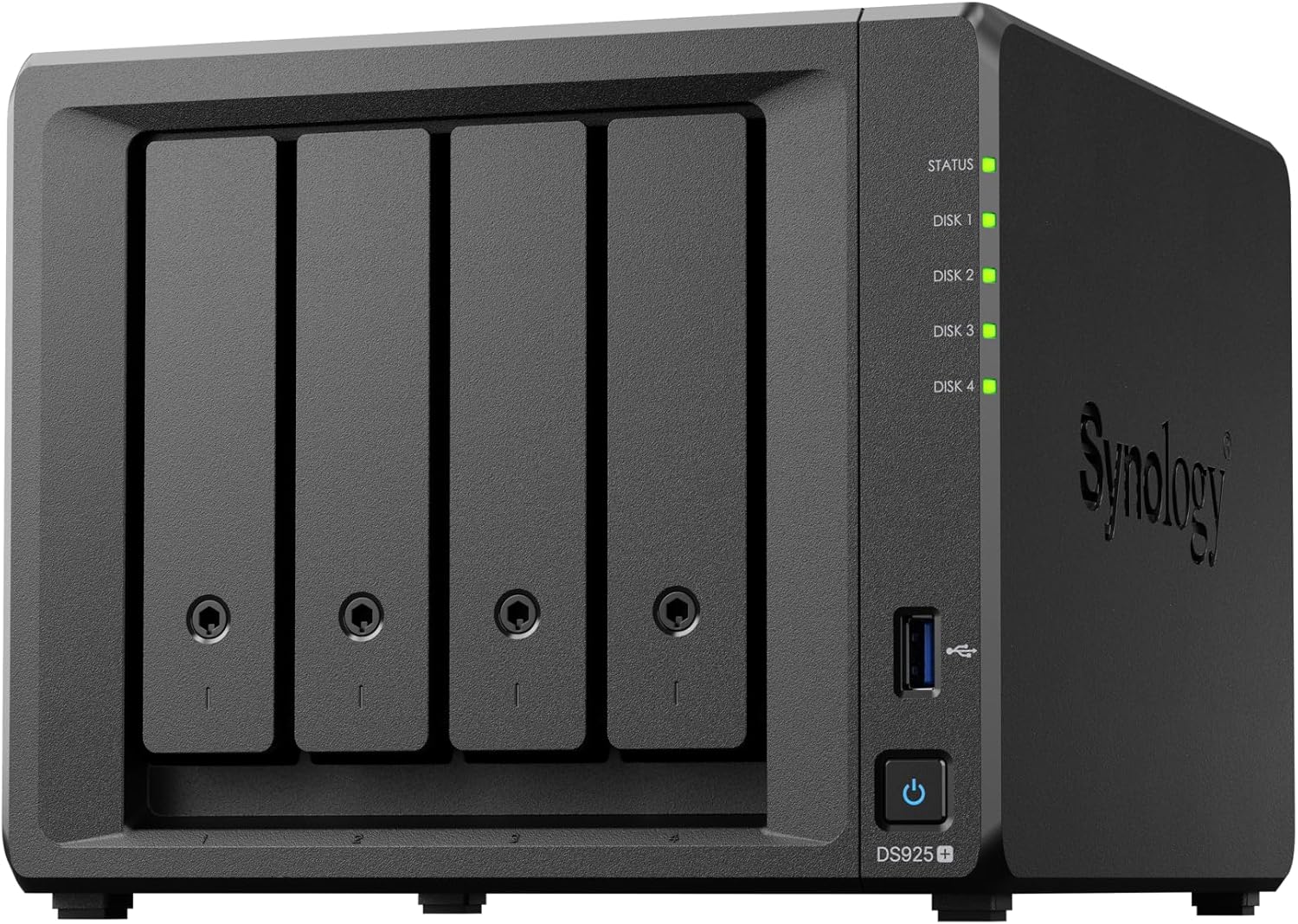
Synology DiskStation DS925+
The Synology DS925+ is the best home NAS for storing local AI model weights — 4-bay diskless, AMD Ryzen V1500B, dual 2.5GbE, and Synology's industry-leading DSM software. Ideal for housing 70B model files and AI datasets.
MEMORY
4 GB
Synology DS925+ for Local AI: The Best NAS for Storing 70B Model Weights at Home
What Can You Run on This?
- Storing 70B+ quantized LLM model weight files (40–80 GB each)
- Centralized AI dataset storage accessible from multiple machines
- Always-on model serving with fast 2.5GbE access
- Home media server doubling as AI model repository
- Docker host for self-hosted AI tools like Open WebUI or Ollama server
Full Specifications
| Chip / Processor | AMD Ryzen V1500B |
|---|---|
| Unified Memory?Unified MemoryApple Silicon uses a single pool of fast RAM shared between CPU and GPU. Larger unified memory = larger models run entirely at full bandwidth — no PCIe bottleneck. | 4 GB |
| Form Factor | 4-Bay NAS |
Pros & Cons
Pros
- DSM operating system is the best NAS software available — polished, reliable, regularly updated
- Dual 2.5GbE enables link aggregation for 5 Gbps effective throughput to a single client
- AMD Ryzen V1500B handles transcoding and Docker containers without slowdown
- 4-bay design with RAID support — protect irreplaceable model fine-tunes and datasets
- Synology's 5-year warranty and excellent long-term software support
Cons
- Diskless — drives sold separately, adding $200–800 depending on capacity
- 4GB RAM is limiting for running multiple Docker containers simultaneously
- No 10GbE built-in — 2.5GbE caps read speeds at ~280 MB/s
Who Should NOT Buy This
Honest assessment
- Users who want 10GbE without buying an add-in card
- Those needing GPU inference on the NAS itself — use a separate Mac Mini or GPU machine
Our Verdict
Synology DiskStation DS925+
The Synology DS925+ is the definitive home NAS for AI builders. The combination of DSM's reliability, dual 2.5GbE, and 4-bay expandability makes it the easiest way to build a centralized model weight library accessible from any machine on your network. Diskless means you control storage costs — pair with 4 × 4TB Seagate IronWolf drives for a 12TB usable RAID 5 array. If you run 70B models from multiple machines, this is the hub they should share.
Frequently Asked Questions
Q1How fast can the Synology DS925+ serve LLM model weights to Ollama?
Over dual 2.5GbE (link aggregated at 5 Gbps effective), a single client can read at ~280 MB/s sustained. A 40GB 70B Q4 model loads from the NAS in roughly 2–3 minutes — comparable to a mid-range NVMe SSD. For repeated loads of the same model, Ollama caches it locally, so NAS speed matters most on first load.
Q2Can I run Ollama directly on the Synology DS925+?
Yes, via Docker in DSM's Container Manager. The Ryzen V1500B handles CPU inference for small models (7B at 1–3 t/s). It's not fast enough for interactive use but works for background or batch AI tasks. For real inference speed, use the NAS as storage and run Ollama on a Mac Mini or GPU machine that mounts the NAS volume.
Q3What hard drives should I pair with the DS925+?
Synology officially recommends NAS-grade drives on their compatibility list. Seagate IronWolf or WD Red Plus are the standard choices — both are designed for 24/7 operation and vibration compensation in multi-drive enclosures. For AI model storage (sequential reads, not random access), CMR drives (not SMR) are preferred. Avoid desktop drives in a NAS.
Q4Can I expand beyond 4 bays later?
Yes. Synology sells expansion units (DX517) that connect via eSATA and add 5 bays to the DS925+. A full setup of DS925+ plus DX517 gives you 9 bays — enough for 90+ TB of raw storage for very large model libraries.
Complete Your Setup
Recommended accessories
Compare With
As an Amazon Associate I earn from qualifying purchases.
Synology DiskStation DS925+
~$500