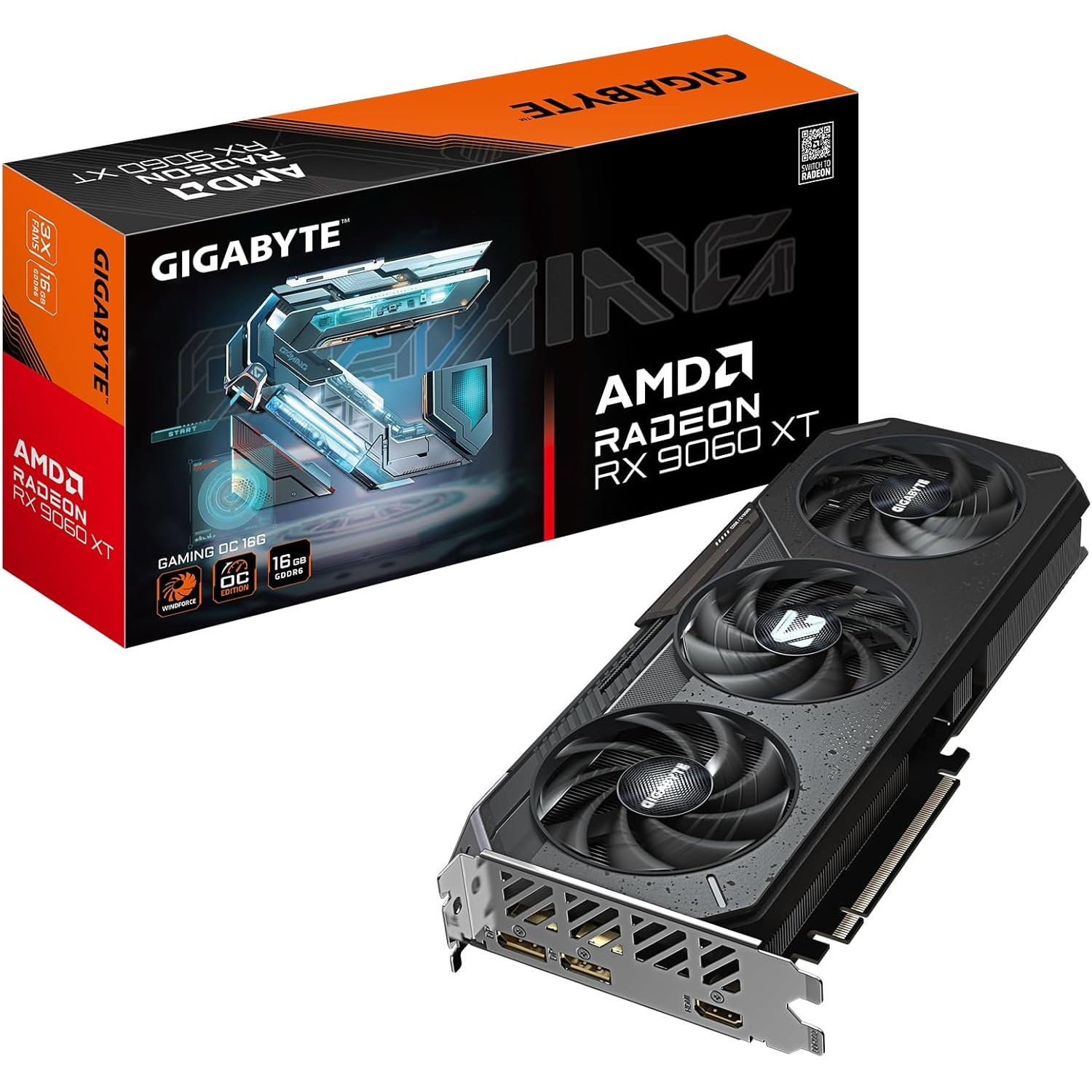
GIGABYTE Radeon RX 9060 XT GAMING OC 16G
The GIGABYTE RX 9060 XT GAMING OC 16G is the VRAM champion at its price tier. Powered by AMD RDNA 4 with 16GB GDDR6, it runs 13B+ LLMs comfortably where 12GB NVIDIA cards hit their ceiling. The WINDFORCE cooling with graphene nano lubricant handles sustained AI workloads — if you can navigate AMD's ROCm ecosystem.
VRAM
16 GB
BANDWIDTH
320 GB/s
TDP
160W
MAX MODEL
14B (Q4) / 13B (Q8)
Running Mistral 7B on the RX 9060 XT: 88 Tokens Per Second on AMD
What Can You Run on This?
- Large local LLM inference (13B–14B models with full GPU acceleration)
- Stable Diffusion XL and FLUX image generation
- Budget AI builds prioritizing VRAM over raw speed
- AMD ROCm / Linux-native AI development
- Whisper transcription and multimodal AI tasks
Full Specifications
| Chip / Processor | AMD Radeon RX 9060 XT (RDNA 4) |
|---|---|
| GPU Cores | 2048 |
| VRAM?VRAMVideo RAM — dedicated memory on a GPU. Determines the maximum model size you can run with full GPU acceleration. Once a model exceeds VRAM, it spills to system RAM over the slow PCIe bus. | 16 GB |
| Memory Bandwidth?Memory BandwidthHow fast data moves between memory and the processor, measured in GB/s. Tokens per second scales nearly linearly with bandwidth — this is the single most important GPU spec for LLM speed. | 320 GB/s |
| TDP (Power Draw)?TDP (Power Draw)Thermal Design Power in watts — the maximum sustained power draw. Higher TDP generally means more performance but more heat and electricity cost. Important for 24/7 always-on setups. | 160W |
| Max LLM Size?Max LLM SizeThe largest language model this hardware can run with full GPU/unified-memory acceleration, at the specified quantization. Larger models require more memory. | 14B (Q4) / 13B (Q8) |
| Form Factor | GPU |
| AI Performance Benchmarks | |
| Tokens Per Second (7B) | 88 t/s |
| Tokens Per Second (13B) | 50 t/s |
| SDXL Generation Time | 4s |
Pros & Cons
Pros
- 16GB GDDR6 — 4GB more VRAM than any RTX 5070 at a comparable price
- RDNA 4 architecture — significant IPC improvement over RDNA 3
- Runs 13B Q8 and 14B Q4 models fully in VRAM — no CPU offload
- WINDFORCE cooling with graphene nano lubricant — quiet and sustained
- Best VRAM-per-dollar at the mid-range tier in 2026
Cons
- ROCm required for GPU-accelerated AI — steeper setup than CUDA on Windows
- 320 GB/s GDDR6 bandwidth is lower than RTX 5070's 672 GB/s GDDR7 — slower tokens/sec
- Windows ROCm support lags Linux — Linux recommended for AI workloads
- Fewer AI software integrations compared to NVIDIA CUDA ecosystem
Who Should NOT Buy This
Honest assessment
- Windows users who want plug-and-play AI — ROCm works best on Linux
- Stable Diffusion heavy users — AMD ROCm has rougher ComfyUI support than CUDA
- Anyone already invested in CUDA software — switching ecosystems has friction
- Running 13B+ models at speed — 16 GB is enough capacity, but bandwidth caps throughput
Our Verdict
GIGABYTE Radeon RX 9060 XT GAMING OC 16G
The GIGABYTE RX 9060 XT 16G is the right choice if VRAM is your top priority. The extra 4GB over RTX 5070 variants means you can run 13B models at Q8 and 14B models at Q4 entirely on the GPU — no CPU offload slowdowns. The trade-off is ROCm: AMD's software stack works well on Linux but requires more setup than plug-and-play CUDA on Windows. If you run Linux and want the most capable mid-range card for larger models, this is it. If you run Windows and just want it to work, choose the RTX 5070 WINDFORCE instead.
Frequently Asked Questions
Q1Does the RX 9060 XT work with Ollama and LM Studio on Windows?
Partially. Ollama on Windows supports AMD GPUs via ROCm, but compatibility is less seamless than NVIDIA. Some models default to CPU inference if ROCm isn't configured correctly. On Linux, ROCm support is mature and Ollama runs fully GPU-accelerated. For Windows users who want a zero-configuration experience, the RTX 5070 WINDFORCE is the safer choice.
Q2Why does the RX 9060 XT have 16GB while the RTX 5070 only has 12GB?
AMD positioned the RX 9060 XT with 16GB GDDR6 as a direct counter to NVIDIA's 12GB GDDR7 in the RTX 5070. AMD trades raw bandwidth (288 GB/s vs 672 GB/s) for more capacity. For AI workloads, this means slower tokens-per-second but the ability to run larger models without quantization compromises.
Q3Can the RX 9060 XT run Stable Diffusion?
Yes. Stable Diffusion, SDXL, and FLUX all run on the RX 9060 XT via DirectML on Windows or ROCm on Linux. ROCm on Linux gives the best performance, comparable to similarly-priced NVIDIA cards. With 16GB VRAM, you can run SDXL and FLUX at high resolutions with multiple ControlNet models loaded simultaneously.
Q4How do I set up ROCm on Linux for the RX 9060 XT?
Install the AMDGPU-PRO or ROCM package from AMD's official repository (amdgpu-install on Ubuntu/Debian). After install, add your user to the 'render' and 'video' groups, reboot, and verify with `rocminfo`. Ollama detects ROCm automatically after this — run `ollama run llama3` and it will use the GPU. The whole process takes 15–20 minutes on Ubuntu 22.04.
Q5How does the RX 9060 XT 16G compare to the Mac Mini M4 Pro for local AI?
The RX 9060 XT in a desktop PC costs significantly less than the Mac Mini M4 Pro for comparable model capacity. The RX 9060 XT's 288 GB/s bandwidth is slower than the M4 Pro's 273 GB/s (similar), but the 16GB GDDR6 is more than the M4 Pro's base 24GB for 13B workloads. The Mac Mini M4 Pro wins on power efficiency (30W vs 150W), noise, and macOS ecosystem. The GPU wins on image generation throughput and CUDA-equivalent (ROCm) flexibility.
Q6Can the RX 9060 XT run ComfyUI and ControlNet?
Yes on Linux with ROCm; with more friction on Windows. ROCm on Linux gives near-CUDA parity for PyTorch-based tools — ComfyUI, A1111, and InvokeAI all support it. Windows support via DirectML is functional but slower and occasionally incompatible with specific ComfyUI nodes. If you rely heavily on ControlNet or custom ComfyUI workflows, Linux is the recommended OS.
Q7Is 288 GB/s bandwidth fast enough for 13B models?
At Q4 quantization, a 13B model requires ~8GB VRAM and generates approximately 50 tokens/second on the RX 9060 XT. That's interactive for chat and fast enough for coding assistants. For 7B models the card does ~88 t/s — comfortably real-time. Where bandwidth shows its limits: 14B+ at Q8 precision drops to ~30–35 t/s. For sustained 13B inference at quality, it's sufficient; for 70B it isn't competitive.
Q8Does the RX 9060 XT support AMD AI hardware acceleration beyond ROCm?
Yes. The RDNA 4 architecture includes dedicated AI accelerators (AMD WMMA instructions) that are leveraged by ROCm 6.x and newer PyTorch AMD builds. Hugging Face Transformers also supports ROCm. Additionally, Windows users can use DirectML for models via ONNX Runtime, which works without ROCm but at lower performance than native ROCm on Linux.
Don't Bottleneck Your Rig
Accessories that unlock this hardware's full potential
Setup Guides
Step-by-step instructions for this hardware
Also Featured In
Compare With
As an Amazon Associate I earn from qualifying purchases.
GIGABYTE Radeon RX 9060 XT GAMING OC 16G
Check Price on Amazon