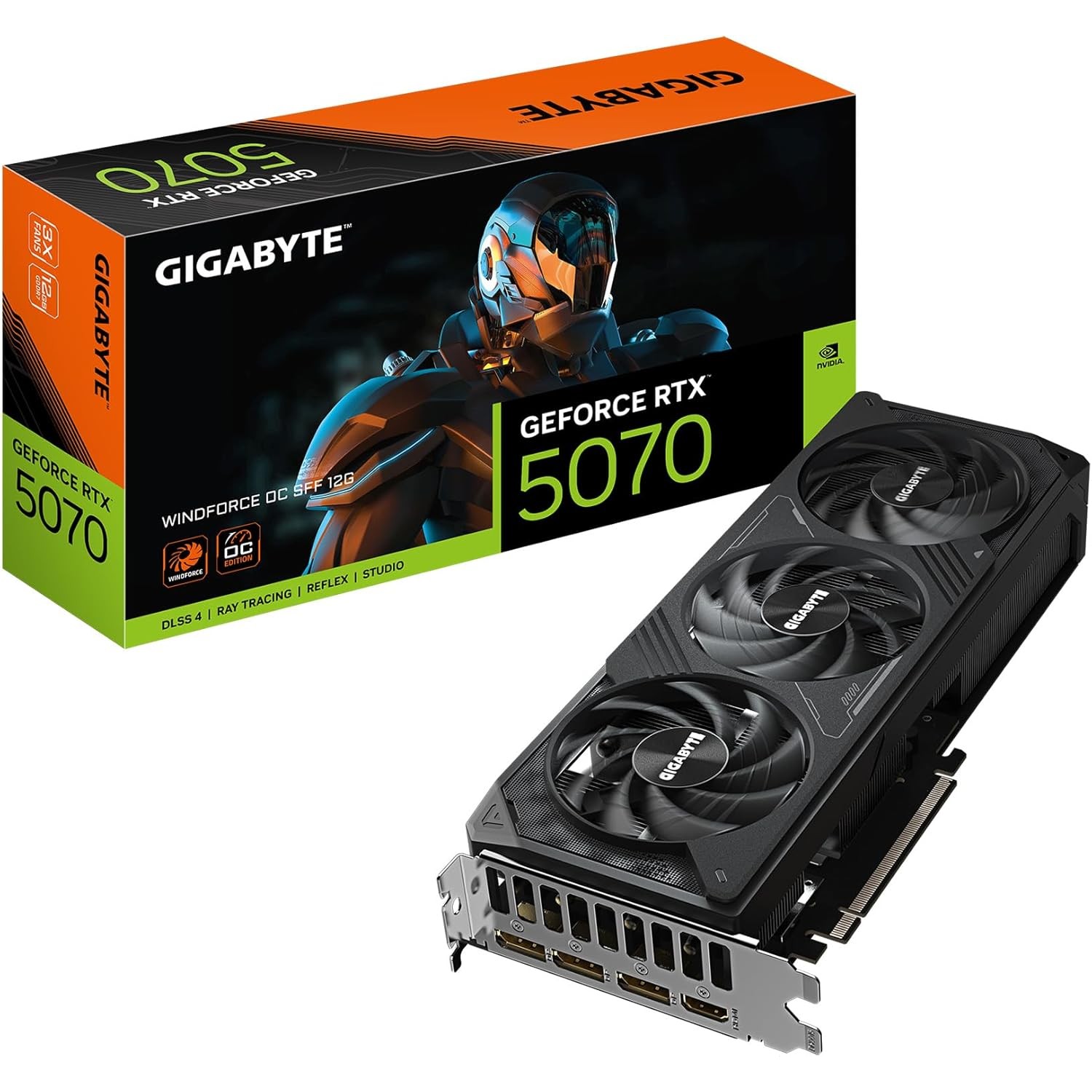
GIGABYTE GeForce RTX 5070 WINDFORCE OC 12G
The GIGABYTE RTX 5070 WINDFORCE OC 12G brings NVIDIA Blackwell architecture and 5th-Gen Tensor Cores to the mid-range market. With 12GB GDDR7 at 672 GB/s, it excels at Stable Diffusion, ComfyUI, and quantized 7B–13B LLM inference — cooled by GIGABYTE's server-grade thermal gel WINDFORCE system.
VRAM
12 GB
BANDWIDTH
672 GB/s
TDP
250W
MAX MODEL
13B (Q4 quantized)
Running Llama 3.1 8B on the RTX 5070: 118 Tokens Per Second
What Can You Run on This?
- Stable Diffusion and SDXL image generation
- ComfyUI workflows and ControlNet
- Local LLM inference (7B full precision, 13B Q4)
- Whisper audio transcription
- CUDA-accelerated AI development
Full Specifications
| Chip / Processor | NVIDIA GeForce RTX 5070 (Blackwell) |
|---|---|
| GPU Cores | 6144 |
| VRAM?VRAMVideo RAM — dedicated memory on a GPU. Determines the maximum model size you can run with full GPU acceleration. Once a model exceeds VRAM, it spills to system RAM over the slow PCIe bus. | 12 GB |
| Memory Bandwidth?Memory BandwidthHow fast data moves between memory and the processor, measured in GB/s. Tokens per second scales nearly linearly with bandwidth — this is the single most important GPU spec for LLM speed. | 672 GB/s |
| TDP (Power Draw)?TDP (Power Draw)Thermal Design Power in watts — the maximum sustained power draw. Higher TDP generally means more performance but more heat and electricity cost. Important for 24/7 always-on setups. | 250W |
| Max LLM Size?Max LLM SizeThe largest language model this hardware can run with full GPU/unified-memory acceleration, at the specified quantization. Larger models require more memory. | 13B (Q4 quantized) |
| Form Factor | GPU |
| AI Performance Benchmarks | |
| Tokens Per Second (7B) | 118 t/s |
| Tokens Per Second (13B) | 68 t/s |
| SDXL Generation Time | 2.5s |
Pros & Cons
Pros
- Blackwell architecture with 5th-Gen Tensor Cores — major AI inference speedup over Ada Lovelace
- 672 GB/s GDDR7 bandwidth — faster token generation than any 12GB GDDR6X card
- WINDFORCE cooling with server-grade thermal gel — stable under sustained AI workloads
- CUDA ecosystem — widest software compatibility for PyTorch, Ollama, ComfyUI
- DisplayPort 2.1a + HDMI 2.1a — supports 4K and 8K displays
Cons
- 12GB VRAM caps out at 13B Q4 — 70B models require CPU offload
- GDDR7 runs warm — case airflow matters for 24/7 inference use
- No advantage over 5070 Ti for workloads that fit in 12GB
Who Should NOT Buy This
Honest assessment
- Anyone who just wants ChatGPT-level chat — a $20/month subscription costs less
- Mini PC users — a discrete GPU needs a full desktop build around it
- MacOS-only households — NVIDIA requires Windows or Linux
- Running 70B+ models — 12 GB VRAM won't fit them even at Q4
Our Verdict
GIGABYTE GeForce RTX 5070 WINDFORCE OC 12G
The GIGABYTE RTX 5070 WINDFORCE OC is a strong mid-range GPU for local AI in 2026. The jump to Blackwell's 5th-Gen Tensor Cores is meaningful for inference speed, and GDDR7 bandwidth at 672 GB/s makes image generation and Whisper transcription noticeably faster than last-gen. The 12GB VRAM limit is the only real constraint — if you need to run 13B+ models comfortably, look at the RX 9060 XT 16G for more headroom, or save for a 16GB RTX 5070 Ti.
Frequently Asked Questions
Q1Can the RTX 5070 12GB run local LLMs?
Yes. The RTX 5070 runs 7B models at full FP16 precision and 13B models at Q4 quantization — all fully GPU-accelerated via CUDA. For Llama 3.1 8B, expect 60–100+ tokens/second, which is interactive and fast. 70B models require partial CPU offload and will be much slower.
Q2How does the RTX 5070 compare to the RTX 4070 Super for AI?
The RTX 5070 is significantly faster. Blackwell's 5th-Gen Tensor Cores deliver higher throughput per watt, and GDDR7 at 672 GB/s is roughly 40% more bandwidth than the 4070 Super's GDDR6X. For Stable Diffusion and LLM inference, expect a 30–50% speed improvement at the same VRAM tier.
Q3Is 12GB VRAM enough for AI in 2026?
For most common workloads yes — Stable Diffusion XL, FLUX, Whisper, and 7B–13B Q4 LLMs all run comfortably. Where 12GB falls short: 13B+ models at Q8 or higher precision, and any 30B+ model without quantization. If you frequently work with larger models, the 16GB RX 9060 XT offers more headroom at a similar price.
Q4How does the RTX 5070 WINDFORCE perform on Stable Diffusion and FLUX?
The RTX 5070 generates SDXL images at roughly 2–3 seconds per image at 1024×1024. FLUX.1-dev runs at approximately 4–6 seconds per image at the same resolution. The 672 GB/s GDDR7 bandwidth is the key driver — it keeps the tensor cores fed during diffusion sampling steps, significantly faster than GDDR6X cards from the previous generation.
Q5Can the RTX 5070 run 70B models?
Not fully in VRAM. A 70B Q4 model requires approximately 40GB, which far exceeds the 12GB VRAM. You can partially offload layers to system RAM using llama.cpp or Ollama's CPU offload mode, but throughput drops significantly — expect 2–5 tokens/second vs 100+ for models that fit in VRAM. For 70B inference, the Mac Mini M4 Pro with 64GB unified memory is a better dedicated solution.
Q6What is the Blackwell architecture improvement for AI over Ada Lovelace?
Blackwell's 5th-Gen Tensor Cores deliver approximately 2× the throughput per core versus Ada Lovelace's 4th-Gen at equivalent clock speeds. For INT8 inference (used in many quantized LLMs), Blackwell also adds FP4 precision support, which can compress models further and accelerate specific workloads. Real-world LLM inference shows 30–50% speed improvement over similarly-priced Ada cards.
Q7Does the WINDFORCE cooling hold up during 24/7 AI inference?
Yes. The WINDFORCE system uses GIGABYTE's server-grade thermal gel compound and a semi-passive fan curve that only activates under load. During sustained LLM inference at 150W TDP, the card stabilizes at 65–72°C — well within safe operating range. The three fans run at moderate RPM, making it quieter than blower-style cards under the same load.
Q8RTX 5070 vs RX 9060 XT 16G — which should I choose for AI?
The RTX 5070 is faster (672 GB/s vs 288 GB/s bandwidth) and easier to set up on Windows via CUDA. The RX 9060 XT gives you 16GB vs 12GB VRAM, enabling larger models at full quality. Choose the RTX 5070 if you prioritize speed on 7B–13B models and Stable Diffusion. Choose the RX 9060 XT if you regularly work with 13B+ models and are comfortable running Linux for ROCm.
Don't Bottleneck Your Rig
Accessories that unlock this hardware's full potential
Setup Guides
Step-by-step instructions for this hardware
Also Featured In
Compare With
As an Amazon Associate I earn from qualifying purchases.
GIGABYTE GeForce RTX 5070 WINDFORCE OC 12G
Check Price on Amazon